Never open six bins to find one thing again.
Snap a photo of any tote, box, or parts bin — AI lists what's inside. Search any item, years later, and get the exact spot: Garage → Rack B → Tote 7.

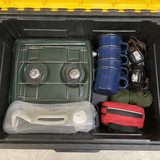

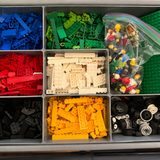

Catalog a bin in under a minute.
Snap
Photo → done. Point at an open tote and AI drafts the contents list. You confirm the chips.
Store
Tell it where the bin lives — Garage → Rack B → Tote 7 — and slap on a QR label. Then straight to the next bin.
Find
Search any item, forever. Get the exact container and the exact shelf — no lids lifted.
One minute. Lid to label to found.
No mock-ups — this is the app, recorded end to end: a camping tote photographed, itemized, shelved, labelled and found again.
- 1Snap itPhotograph the open tote. AI lists the camp stove, the headlamps, the first-aid kit — and outlines each one on the photo.
- 2Store itGive it a place — Garage → Rack B — and it gets a short code like G-RB-01 and a QR label anyone can scan.
- 3Find itMonths later, ask “where's the camp stove?” and get the exact bin and shelf. No lids lifted.
Snap the bin. AI does the listing.
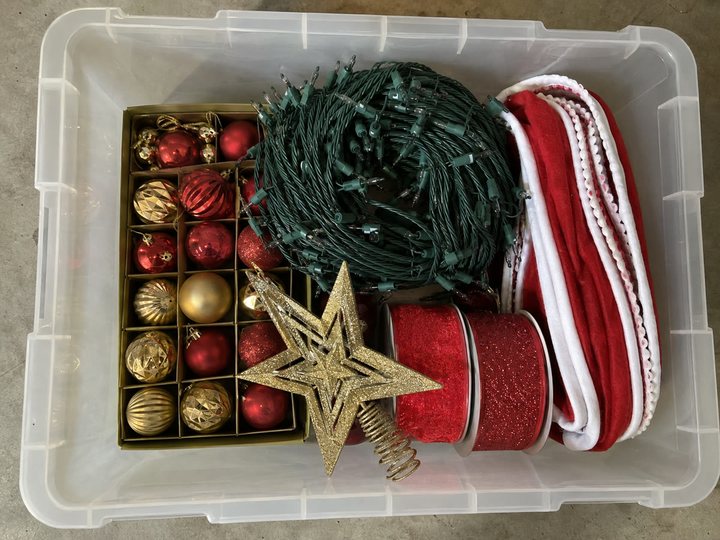
AI drafts, you confirm — tap a chip to fix it, speak to add what the camera can't see (“also the tree stand base”).
Ask once. Get an exact spot.
Every bin gets a QR label.
Nobody needs the app to read it.
Print label sheets straight from the app — Avery-compatible and thermal-printer friendly. Stick one on every tote.
Scan a label with any phone camera and the container's contents open right in the browser — photos, items, location. No app. No login. No account.
Your spouse checking the garage, a guest hunting for towels, future-you standing in the storage unit — everyone gets the answer without lifting a lid.
Built for stuff that stays put.
AI photo itemization
Snap an open container, get an itemized list to confirm — no typing required.
Household sharing
One join code and the whole household sees — and edits — the same inventory. No per-seat pricing.
Seasonal pick lists
“Get the Christmas stuff down” becomes one list, grouped by location, so the attic trip happens once.
Aisle check before you buy
“Do I already own this?” Search from the hardware store before you buy duplicate #4.
Bins move. So does the record.
Re-home a tote in two taps — search and breadcrumbs update instantly, with a moved-when trail.
Voice everything
“Also the tree stand base” — add, edit, and search hands-free while your hands hold the tote.
No bars in your unit? Doesn't matter.
Storage units are steel-and-concrete signal graveyards — so StorageBuddy saves to your phone first. Photograph, name, place and label a whole unit with zero reception; containers and photos sync the moment you drive out, and the AI itemizes any bins it missed once you're back in signal.
Your data outlives us.
Home-inventory apps have a bad habit: they shut down and take years of your cataloging with them. We think that's disqualifying — so we built the exit door first.
One tap exports everything you've ever entered: a spreadsheet of every item, every photo at full resolution, and a printable PDF report — zipped and yours.
Export is built into every plan. An inventory you can't take with you isn't yours.
AI drafts. You confirm.
And it never fakes a count.
Point it at a drawer of 500 mixed screws and it says “assorted screws” — it will never invent “347 × M5” to look smart.
Point it at your labeled compartment bins and it reads the labels into chips instead of guessing at loose parts. Unlabeled slots get a generic chip you rename in a tap.
Every AI suggestion arrives as a chip you confirm, fix, or delete. Your inventory stays yours — the AI just saves you the typing.
Coarse quantities — full / low / out — because restock decisions don't need a screw census.
Start free. Upgrade when you outgrow it.
Try the whole
system.
- ✓ Your first 10 containers, unlimited items
- ✓ Monthly allowance of AI photo scans
- ✓ QR labels & login-free bin view
- ✓ Household sharing
- ✓ Full export of your data
- ✓ Works offline
For the big
catalog weekend.
- ✓ Everything in Free
- ✓ Unlimited AI scans
- ✓ Unlimited photo backup
- ✓ First in line for new features
Pay once.
Own it forever.
- ✓ Everything in Plus, permanently
- ✓ One-time purchase
- ✓ For people who hate subscriptions (we get it)
We're still dialing in prices and tier limits — final numbers land with the app, no surprises.
Fair questions, straight answers.
+ Is there a limit on how many items or bins I can add?
+ What happens to my inventory if StorageBuddy shuts down?
+ My storage unit has no cell signal. Does the app still work?
+ Can my spouse or housemates see the inventory?
+ Do guests need the app to see what's in a bin?
+ Can the AI really count a drawer of 500 screws?
+ Which platforms does it run on?
+ What does it cost?
Every bin, finally
searchable.
Ten tips for every place you keep stuff.

Holiday decoration storage: 10 tips for Halloween, Hanukkah, Christmas and more
October to January is one long storage season. Give every holiday its own tote and colour, pack powered props and inflatables the way their makers say, keep wax and latex out of the heat, and photograph each lid before it closes.
Read the 10 tips →10 garage organization tips that still work in March
Not a makeover, a set of rules. Zone by how often you reach for things, standardize the tote, respect the shelf's weight rating, and photograph every bin so you never open six to find one.
Read the 10 tips →All posts → · Free organization guides for your home: the garage system that sticks and storage unit inventory.

Moving, not storing?
Cross-town or cross-country — we've got you covered. MoveBuddy AI brings the same snap-to-list magic to moving boxes, so everything's findable on the other end.