Storage units fail in a specific way. Move-in day is a sprint: everything goes in, heaviest first, in whatever order the truck was packed. Six months later the unit is a wall of identical boxes, the paper list (if there was one) is in a drawer at home, and the only way to answer "is the camping stove in there?" is a forty-minute round trip and twenty minutes of lid-lifting. The fix is the same one that works in a garage, with two twists: there's no signal inside the unit, and more than one person usually has a key.
1. Map the unit as places, not as a pile
Before anything goes in, decide where things will live and give those places names. A 10×10 unit is small enough to describe completely in five lines:
- Front — grab zone. The first four feet inside the door: anything you'll touch more than twice a year (seasonal clothes, sports gear, the spare chairs).
- Left wall — shelved. One or two steel racks. Totes face label-out, three high, never deeper than one tote.
- Back wall — long term. Furniture, mattresses on edge, the boxes you hope not to open before you move again.
- Right wall — flat and tall. Headboards, framed art, table tops, bikes on hooks.
- Centre aisle — empty. Keep a walkway to the back wall. A unit you can't walk into is a unit you can't search.
In an inventory app those names become nested locations: Unit 214 → Left wall → Shelf 2. Every container you add gets placed inside one, so a search result is a breadcrumb, not just a box number — and if the shelf gets renamed or moved, nothing has to be relabelled.
2. Number every bin — then stop writing on them
Detailed written labels go stale the first time someone adds "a few more things" to a box. Give every container a short, stable code instead and keep the contents list somewhere you can edit from home:
- One code per container, big enough to read from the aisle. Zone-based codes do the work for you: U-LW-07 is Unit → Left wall → bin 7. StorageBuddy generates these automatically from the location you pick, and they stay put when the bin moves.
- Same-size totes wherever you can. Identical 27-gallon bins stack three high safely and swap shelf positions without a reshuffle; a zoo of liquor-store boxes can't be reorganised without unpacking.
- Put the code on two sides and the lid. You never know which face will be visible after the next rearrangement.
- QR labels beat printed codes. Scan one with any phone camera and the bin's live contents open in the browser — no app, no login. Print a sheet of blanks before move-in day and bind each label to its bin as you shelve it.
3. Photograph before you stack — the habit that makes the rest work
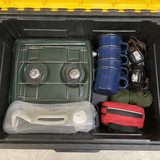
The single rule that separates searchable units from black holes: no lid closes unphotographed. Top-down, in good light, before the bin goes on the shelf. Ten seconds.
- The photo is a contents list that can't drift, because it shows exactly what was inside the last time the box was shut.
- It kills the "MISC" box problem. You don't have to describe the chaos — the picture remembers what "misc" meant.
- With an AI inventory app the same photo becomes a searchable item list: type "camp stove", get Unit 214 → Left wall → U-LW-07. That's the difference between a photo album and an inventory.
- Snap the outside too, so you recognise the bin on the shelf instead of reading twenty labels.
4. Move-in day, in order
| When | Do | Why |
|---|---|---|
| Night before | Create the space, add the five locations, print a sheet of blank QR labels. | Nothing to think about when your arms are full. |
| At the truck | Open bin → photograph inside → stick a label → scan it → pick the location → close. | Each bin is itemized, coded and placed before it leaves the tailgate. |
| In the unit | Shelve by location. Back wall first, grab zone last. Face every label out. | The breadcrumb you recorded matches where the bin actually sits. |
| Door closed | Walk the aisle, photograph each wall, invite whoever else has a key. | A wide shot per wall answers "which rack?" at a glance; shared access stops the "did you take the…?" calls. |
5. Keep it true for years
- Search first, drive second. If the list says it's there, it's there. If the list says it's at home, you just saved an hour.
- Record moves when they happen. A bin that comes home for the holidays gets re-homed in two taps; its code and label don't change, its breadcrumb does, and the move is dated so you can see where it's been.
- Re-photograph whenever a lid opens. Contents drift; the closing photo keeps the record honest.
- Export once a year. A spreadsheet of every item, every photo and a printable PDF, in a ZIP you keep. Useful for insurance, essential if you ever change apps — and included on every plan.
- Audit at the unit, not at home. The yearly visit is when you ask "why are we paying to store this?" with the box in your hands.
Frequently asked
Does a storage unit inventory app work with no cell signal inside the unit?
StorageBuddy AI saves to your phone first. You can photograph, name, place and label every container in the unit with zero bars; containers and photos sync when you're back in signal. AI itemization needs a connection, so it catches up on those bins afterwards — or type the items on the spot.
Can my spouse or business partner see the storage unit inventory too?
Yes. Share the space with a join code or QR code and everyone sees and edits the same inventory. Sharing is included on every plan, including Free.
How many bins can I inventory for free?
Free covers your first 10 containers per space with unlimited items inside them, plus QR labels, sharing and export. Plus and Lifetime remove the container cap. If you later drop back to Free you keep full access to everything you entered — you just can't add an 11th container.
What if I move bins between the unit and home?
Re-home the container in the app in two taps. Its short code and QR label stay the same, the breadcrumb updates everywhere, and the move is recorded with a date so you can see where a bin has been.
Snap it. Store it. Find it.
StorageBuddy AI is the numbered-bin system with the busywork removed: photograph an open container and AI writes the contents list; QR labels link every bin to its live inventory; search “camp stove” and get Unit 214 → Left wall → U-LW-07. Free to start, and nothing in it ever expires.
Get the appWatch the one-minute walkthrough →